

You just unboxed your super clone Rolex. The weight feels right, the dial catches the light exactly the way you remember from the display case, and now you need to actually set the thing up. That’s where this guide comes in.
Super clone movements — whether based on the 3135, 3186, or 4130 architecture — mirror the crown position logic of their genuine counterparts closely enough that official Rolex user guides are actually useful references. But there are a handful of quirks and gotchas specific to clones that Rolex won’t tell you about, because, well, they don’t make clones. We will.
Before we get into model-specific instructions, burn this into memory: always screw the crown back down after any adjustment. Every single time. No exceptions. As Rolex explains in their own care and service guidelines, the screw-down crown is the component that guarantees water resistance — and that’s true whether the watch cost $400 or $14,000. You’d be surprised how many people skip this step and then wonder why moisture fogged up their dial after a shower.
Submariner and GMT-Master II Setup
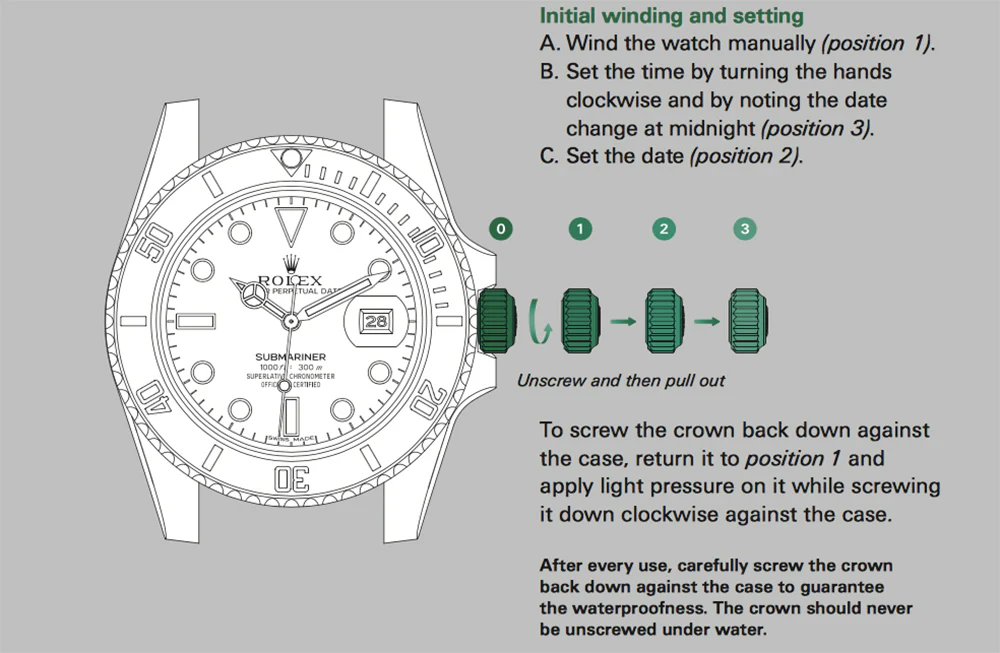
The Submariner and GMT-Master II share the same core movement architecture in super clone form. That means the crown works identically on both — same positions, same winding direction, same hacking seconds. The one difference that matters is the GMT’s independent 24-hour hand, which we’ll deal with separately below.
Most super clone Submariners and GMTs run on cloned 31xx-series movements. These replicate the genuine caliber’s crown position logic faithfully enough that you can follow Rolex’s official Submariner guide or GMT-Master II guide side by side with these instructions and they’ll line up.
Crown Positions (Submariner Date and GMT-Master II)
- Position 0 — Crown screwed down flush against the case. The wearing position. The watch is sealed.
- Position 1 — Crown unscrewed and sitting at rest, closest to the case. This is where you manual wind.
- Position 2 — Crown pulled out one click. On the Submariner Date, this sets the date (quick-set). On the GMT-Master II, this jumps the independent local hour hand in one-hour increments and rolls the date along with it.
- Position 3 — Crown pulled all the way out. Time-setting position. The seconds hand stops — that’s the hacking feature — so you can sync to a reference clock.
Winding It Up for the First Time
If your watch is fresh out of the box or has been sitting in a drawer for a week, it needs a manual wind to get going. Unscrew the crown by turning it counterclockwise until it pops free into Position 1. Then wind clockwise — that’s forward, away from you — about 30 to 40 turns. You’ll feel the mainspring build resistance as it charges up.
A common mistake: turning the crown the wrong direction. Counterclockwise winding does nothing on these movements. As experienced watchmakers will confirm, it won’t cause damage, but you’ll stand there winding for two minutes wondering why the balance wheel isn’t moving.
After that initial wind, daily wear handles the rest. The rotor does its job. Most cloned 31xx movements hold roughly 48 hours of power reserve — close enough to the genuine spec that you won’t notice a difference in daily use.
Setting the Date (Submariner Date)
Push the crown into Position 2 and turn clockwise. The date wheel clicks forward one number per rotation.
Here’s the critical rule that too many people learn the hard way: never quick-set the date between 8 PM and 4 AM. During that window, the date-change gears are partially meshed, and forcing the quick-set can shear teeth off the date wheel. If you’re not sure whether the watch is reading AM or PM — and with a stopped watch, you won’t be — pull to Position 3, advance the hands until the date snaps over (that’s midnight), then set the time to something safe like 6:00. Push back to Position 2, set the correct date, return to Position 3, and set the actual time.
It sounds like a lot of steps, but it takes about 30 seconds once you’ve done it a couple times. Think of it as the one ritual these watches demand in exchange for decades of reliability.
Setting the Time
Pull the crown to Position 3. The seconds hand stops. Turn clockwise to advance the hands. If you haven’t confirmed AM/PM yet, sweep through midnight and watch for the date change — that tells you exactly where midnight sits. Set your time, push the crown in, and screw it down.
One thing worth mentioning: try to set the time by moving the hands forward rather than backward. Most clone movements handle reverse adjustment fine, but the fewer times you run the gear train backwards, the better. Old watchmaker’s habit, and a good one.
Setting the GMT Function (GMT-Master II Only)
The GMT-Master II’s calling card is that independent 24-hour hand with the arrow tip. Getting it set up properly requires a specific sequence, but once it’s dialed in, it stays put.
- Set your home time first. Pull the crown to Position 3. The seconds hand stops. Turn the crown to set both the minute hand and the 24-hour GMT hand to your home or reference time zone. These two move together in this position.
- Set local time. Push the crown to Position 2. Now turn it to jump the standard hour hand forward or back in one-hour clicks. The 24-hour hand doesn’t budge. The date follows the local hour hand, so it rolls over automatically when you cross midnight.
- Read a third timezone off the bezel. Rotate the GMT bezel to offset against the 24-hour hand and you’ve got a third reference at a glance.
- Screw the crown back down.
This is one of those areas where quality super clones genuinely impress. The independent hour hand snapping into clean one-hour increments is a detail that cheaper reps get completely wrong — the hand drifts, it lands between markers, it sometimes doesn’t jump at all. A proper super clone handles it crisply. If yours doesn’t, that’s a sign the movement inside isn’t the grade you were promised.
Shop This Model
Explore our full collection of these iconic references:
- Rolex Submariner 40mm Black Dial 116610LN
- Rolex GMT-Master II Batman 116710BLNR
- All Replica Rolex Submariner
- All Replica GMT-Master II
Daytona Chronograph Setup
The Daytona adds a layer of complexity that the other models don’t have: chronograph pushers. Two extra push-pieces flanking the crown, three subdials, and a central chronograph seconds hand that sweeps when activated. It’s a more interactive watch, and it demands a slightly different approach to setup. Rolex’s Daytona user guide covers the same fundamentals that apply here.
The Daytona is also the model where the gap between a cheap replica and a true super clone becomes most obvious. A proper super clone runs a cloned 4130-based movement where the running seconds sits at 6 o’clock, the 30-minute counter at 3, and the 12-hour totalizer at 9 — exactly like the genuine article. Cheaper versions shuffle these around or use a quartz module with a fake ticking chronograph hand.
Key Components
- The Crown — Handles time setting and manual winding just like the Submariner. Modern Daytonas don’t have a date complication, so there are only two functional positions after unscrewing: winding (neutral) and time-setting (pulled out).
- Top Pusher (2 o’clock) — Starts and stops the chronograph.
- Bottom Pusher (4 o’clock) — Resets the chronograph hands to zero.
Reading the Subdials
- 3 o’clock subdial — 30-minute elapsed counter. Tracks chronograph minutes up to 30, then starts over.
- 6 o’clock subdial — Small running seconds. This hand moves all the time, whether you’re timing something or not. It’s how you confirm the movement is alive and kicking.
- 9 o’clock subdial — 12-hour elapsed counter. For longer timing sessions.
Using the Chronograph
- Start — Press the top pusher. The central chronograph seconds hand begins sweeping. The small seconds at 6 keeps running on its own.
- Stop — Press the top pusher again. The chronograph hand freezes so you can read elapsed time off the subdials.
- Reset — With the chronograph stopped, press the bottom pusher. All chronograph hands snap back to zero.
There is one rule that overrides everything else with this watch: never press the reset pusher while the chronograph is running. This applies to genuine Daytonas and clones alike. The reset lever engages with moving gears, and the resulting collision can chip wheels, bend pivots, or jam the entire chronograph module. It’s the single most common mistake new Daytona owners make. Always stop first, then reset. Every time. No shortcuts.
Crown Positions (Daytona)
- Position 0 — Screwed down. Wearing position.
- Position 1 — Unscrewed, neutral. Manual winding. Turn clockwise 30 to 40 times if the watch has been sitting.
- Position 2 — Pulled out. Time-setting. The small seconds hand hacks (stops) so you can sync precisely.
Winding and time-setting work the same way as the Submariner — same counterclockwise unscrew, same clockwise winding direction, same everything. The only functional difference is the lack of a date, so you skip Position 2 entirely for date setting and go straight to time adjustment.
Shop This Model
Sky-Dweller Setup
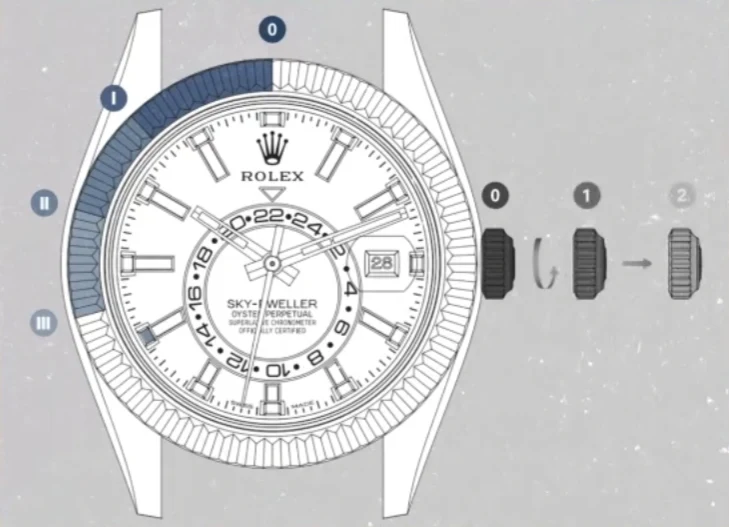
The Sky-Dweller is Rolex’s most complicated watch, full stop. Annual calendar, dual time zones, month display — it does more than anything else in the catalog. And the super clone version has become one of the most impressive replicas on the market precisely because it pulls all of this off in a package that looks and functions almost identically to the genuine article.
Here’s the thing about super clone Sky-Dwellers versus the genuine Sky-Dweller’s Ring Command bezel system: the clones use a simplified approach. Instead of rotating the bezel to notched positions that mechanically select which function the crown controls, the super clone lets you adjust the month via direct bezel rotation and handles everything else through standard crown positions. Honestly? A lot of owners prefer this. It’s simpler, there’s less to go wrong, and the end result — correctly displayed local time, home time, date, and month — is functionally identical.
Crown Positions (Sky-Dweller Super Clone)
- Position 0 — Crown screwed down. Normal wearing mode.
- Position 1 — Crown unscrewed, neutral. Manual winding.
- Position 2 — Crown pulled one click. Adjusts the date (clockwise) and the 24-hour home-time disc (counterclockwise).
- Position 3 — Crown pulled fully out. Sets local time (center hour and minute hands). In most clones, the hour hand jumps independently in one-hour increments — ideal for travel without disturbing the home-time display.
Manual Winding
Same drill as every other model. Unscrew counterclockwise until the crown pops to Position 1, wind clockwise 30 to 40 turns, and you’re charged up. Screw back down.
Setting the Month (Bezel Adjustment)
This is unique to the Sky-Dweller. Hold the watch face-up and rotate the fluted bezel — usually counterclockwise, but try both directions gently if counterclockwise doesn’t engage — until the small red marker lines up with the correct month aperture around the dial edge. January sits at 1 o’clock, February at 2 o’clock, and so on around to December at 12 o’clock.
Two things to know: First, this is a manual adjustment. The month won’t auto-advance, so you’ll need to rotate the bezel on the first of each month (or whenever you realize it’s been showing March for three weeks). Second, you don’t need to unscrew the crown for this. The bezel rotation is independent of the crown system.
Setting the Date and Home Time
Unscrew the crown and pull to Position 2. Turn clockwise to roll the date forward. Turn counterclockwise to rotate the 24-hour disc until the red arrow points to your home-time hour. Push and screw down when finished.
The 24-hour disc uses a red triangle pointer against a graduated ring, so you can tell AM from PM at a glance — the 6 position on the disc is 6 AM, the 18 position is 6 PM. This is genuinely useful for anyone tracking a second timezone, and it works the same way on the clone as it does on the genuine piece.
Setting the Local Time
Unscrew the crown and pull to Position 3. Turn the crown to set the local hour and minute hands. In most super clone Sky-Dwellers, the hour hand jumps in clean one-hour increments without disturbing the 24-hour disc underneath — same behavior as the genuine caliber. Cross midnight while adjusting and the date rolls over automatically.
Push and screw the crown when you’re done. By this point you should have local time on the center hands, home time on the 24-hour disc, the correct date at 3 o’clock, and the right month marked in red. That’s a lot of information from one dial, and it’s why the Sky-Dweller has such a dedicated following.
Shop This Model
Datejust and Other Three-Hand Models
The Datejust, Air-King, Explorer, Oyster Perpetual, and similar three-hand models all follow the exact same setup process as the Submariner Date. Position 1 for winding, Position 2 for quick-set date, Position 3 for time. The 8 PM to 4 AM date-setting danger zone applies to every single one of them.
The Datejust deserves a special mention here because it’s been in continuous production since 1945, making it the longest-running model in Rolex’s history. That means there are dozens of dial colors, bezel styles, and bracelet configurations available in super clone form — fluted bezel on a Jubilee, smooth bezel on an Oyster, two-tone, full gold, you name it. But here’s the thing: regardless of what the outside looks like, the crown operation never changes. A 36mm smooth bezel Datejust and a 41mm fluted two-tone version both use the same crown positions. Set one and you’ve set them all.
If you’re considering a Datejust and want to understand what makes specific references unique, our guide to the Rolex reference number system breaks down exactly what those model codes mean.
Shop This Model
General Winding and Setting Tips
These apply across every model covered above. Some of them are standard watchmaker advice; others are specific things we’ve learned from years of handling super clone movements.
- Wind off your wrist. This isn’t just a formality. When the watch is strapped on, pulling the crown outward puts lateral stress on the stem where it enters the case tube. Over time, that side-loading can bend the stem or wear the tube threads. Slide the watch off, set it, put it back on. Takes five extra seconds.
- If the crown feels gritty, stop. A rough or grinding feel when unscrewing usually means there’s debris in the crown tube threads or the tube itself is wearing. Forcing it can cross-thread the tube — a repair that requires opening the case and replacing the entire tube. Not cheap, not fun. If it feels wrong, have it looked at.
- Snug, not torqued. Finger-tight is enough for the screw-down crown. Cranking it with force doesn’t make it more water-resistant — it just chews up the threads faster. Stop when you feel firm resistance.
- Rinse after salt or chlorine. Screw the crown down first, obviously, then rinse the whole watch under fresh water after ocean or pool exposure. Salt crystals and chlorine residue degrade rubber gaskets over time, and replacing those gaskets is preventable maintenance you can skip entirely with a 30-second rinse.
- Know your power reserve. Most super clone 31xx-based movements hold around 48 hours. Newer clones built on 32xx-type platforms can reach approximately 70 hours, matching the genuine Powermatic upgrade. If your watch is dying overnight despite a full wind and a full day of wear, the movement likely needs service — a service interval, weak mainspring, or poorly lubricated gear train will all show up as reduced reserve.
- Don’t set the time backwards if you can avoid it. This is mentioned above but it’s worth repeating. Advancing the hands forward puts the gear train under normal load. Running it backwards reverses the load on the setting wheel and cannon pinion, which can accelerate wear. Most modern movements tolerate it, but why add unnecessary stress?
For a deeper look at the engineering behind these movements and what separates a good clone from a mediocre one, see our breakdown of Rolex movements and what makes them special.
Frequently Asked Questions
1. How many crown positions does a super clone Submariner or GMT-Master II have?
Three functional positions after unscrewing. Position 1 (neutral, for winding), Position 2 (one click out, for quick-set date on the Sub or independent hour hand on the GMT), and Position 3 (fully out, for time setting with hacking seconds). The GMT-Master II uses Position 2 to independently jump the local hour hand.
2. Can I set the date on my super clone at any time of day?
No. Avoid quick-setting the date between roughly 8 PM and 4 AM. During this window the date-change mechanism is partially engaged, and forcing it can chip teeth on the date wheel. If you don’t know whether the watch is in AM or PM mode, advance the hands through midnight first and watch for the date to flip over — that’s your midnight reference point.
3. How do I manually wind my super clone if it has stopped?
Unscrew the crown counterclockwise to Position 1. Wind clockwise 30 to 40 turns for a full mainspring charge. Screw the crown back down firmly. Once it’s running, wearing it daily will keep it wound through the automatic rotor.
4. What is the correct way to set the GMT function on a super clone GMT-Master II?
Set your reference (home) time first in Position 3 — this moves the minute hand and the 24-hour GMT hand together. Then push to Position 2 and turn the crown to jump the local hour hand in one-hour increments to your current time zone. The date is linked to the local hour hand and rolls over when you cross midnight.
5. Can the super clone GMT-Master II display three time zones at once?
Two simultaneously: local time on the center hands and home time on the 24-hour hand. For a third reference, rotate the GMT bezel to offset against the 24-hour hand. This is the standard method all GMT-Master owners use, whether genuine or clone.
6. Can I press the chronograph reset button on the Daytona while it is running?
Never. Pressing the reset pusher while the chronograph is engaged can damage the movement in both genuine and clone calibers. Always stop the chronograph with the top pusher first, then press reset. This is the single most important rule of owning a Daytona.
7. What do the three subdials on the Daytona show?
The subdial at 3 o’clock is the 30-minute elapsed counter, 9 o’clock is the 12-hour elapsed counter, and 6 o’clock is the continuous small seconds hand that runs whether or not you’re using the chronograph.
8. How does the month setting work on the super clone Sky-Dweller?
Rotate the fluted bezel (usually counterclockwise) until the red marker aligns with the correct month aperture around the dial. January is at 1 o’clock, February at 2 o’clock, through December at 12 o’clock. This is purely manual — adjust it at the start of each month. No crown involvement needed.
9. How is the Sky-Dweller super clone different from the genuine version mechanically?
The genuine Sky-Dweller uses Rolex’s Ring Command bezel, which mechanically couples the bezel rotation to the crown’s function selector. Super clones skip this system and use direct bezel rotation for the month plus standard crown positions for everything else. The functional result is nearly identical, and many owners find the clone approach simpler for everyday use.
10. What should I always do after setting my watch?
Screw the crown down clockwise until snug. Every time, no exceptions. This maintains the water-resistant seal. It’s the single most important habit for any watch with a screw-down crown, and forgetting it is the most common way people end up with moisture damage.
More Helpful Guides
- Best Replica Rolex for Beginners: Starter Models and Expert Advice
- Rolex Reference Number Guide: Understand Every Code
- Rolex Movements: What Makes Them Special
- History of Replica Rolex Watches: From Fakes to Super Clones
- Rolex Submariner: The Iconic Model That Defines Dive Watches
- Our Craftsmanship: How Super Clone Rolex Watches Are Made