

How to Set and Wind Your Super Clone Rolex: A Step-by-Step Guide
Submariner and GMT Master II functions
Welcome to the definitive hands-on guide for super clone owners! These high-quality replicas are crafted with exceptional attention to detail, delivering near-identical aesthetics, feel, and functionality to the originals at a fraction of the cost. Powered by reliable cloned movements, they offer impressive accuracy, durability, and complications that perform remarkably close to genuine pieces — with only minor simplifications in some versions for better everyday reliability.
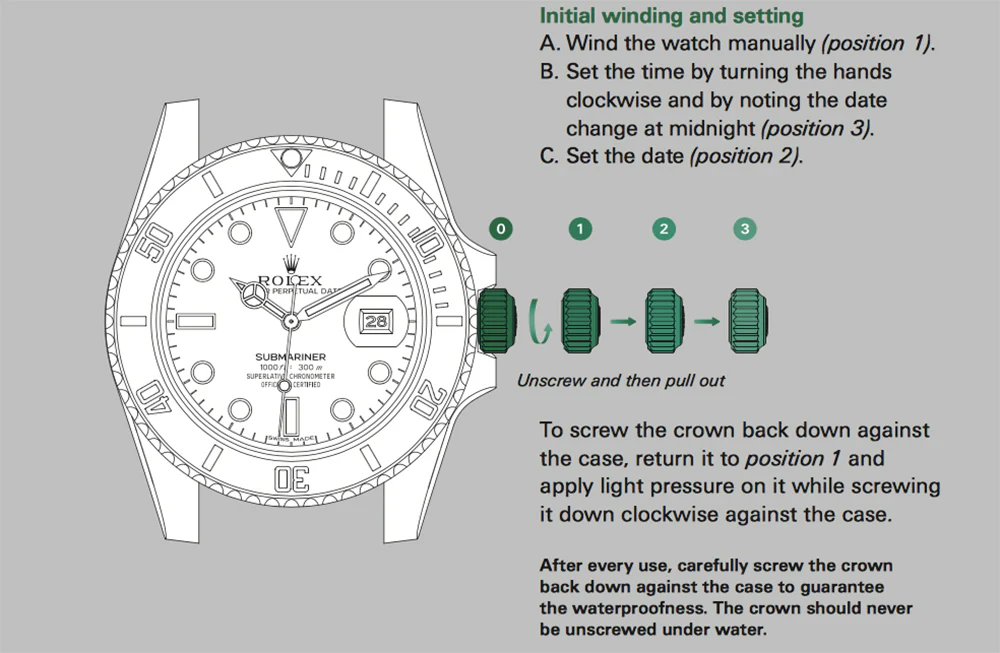
The Rolex Super Clone, renowned for its precision and durability, comes with a unique winding and setting mechanism that ensures optimal performance exactly like the Genuine Rolex timepiece. If you’re new to the replicas or just need a refresher, this guide walks you through the steps for correctly winding, setting the time, and adjusting the date. Understanding the crown’s different positions is key to making these adjustments.
1. Wind the Watch Manually (Position 1)
To begin, ensure your watch is properly wound. In its normal, screwed-down state, the crown is in position 0. To wind the watch manually, unscrew the crown and pull it into position 1. Rotate the crown clockwise to wind the watch. This step is essential if the watch has been inactive for a while.
2. Set the Date (Position 2)
To adjust the date, push the crown into position 2 (the middle position). Rotate the crown clockwise or counterclockwise to change the date. Be sure to avoid setting the date between 8 PM and 4 AM, as this is when the date-change mechanism is engaged and could damage the movement.
3. Set the Time (Position 3)
Next, you’ll set the time. Pull the crown out to position 3 (the furthest position) to adjust the hands. Turn the crown clockwise to move the hands forward. You’ll notice the date will change around midnight—this is your indicator that you’ve reached the proper time of day. Always set the time by turning the hands clockwise to ensure accuracy.
4. Secure the Crown
After you’ve set the time and date, it’s critical to screw the crown back into position 1 and apply light pressure while turning it clockwise to ensure it’s securely sealed. This guarantees the waterproof functionality of the watch. Always check that the crown is tightly screwed down after use, especially if you’ve been underwater.
 Shop This Model:
Ready to get your own? Explore our collection:
Daytona functions
Understanding the Daytona’s Key Features:
- The Chronograph Function: The primary feature of the Rolex Daytona is its chronograph function, which allows you to measure elapsed time with a stopwatch-like mechanism.
- The Subdials: The Daytona has three subdials that display additional timekeeping information. These include:
- The 30-minute counter at the 3 o’clock position
- The 12-hour counter at the 9 o’clock position
- The small seconds subdial at the 6 o’clock position
1. Start the Chronograph (Press the Top Push-Button)
To begin using the chronograph, you need to start the stopwatch function. On the genuine Rolex Daytona, this is done by pressing the top push-button (located on the right side of the case). When you press this button, the central chronograph hand (the large second hand) begins to move, and the stopwatch function is activated. The small seconds hand at the 6 o’clock subdial will continue to run while the chronograph is in use.
2. Stop the Chronograph (Press the Top Push-Button Again)
To stop the chronograph, press the top push-button once more. The chronograph hand will stop at the point where it was last when you pressed the button, allowing you to read the elapsed time.
3. Reset the Chronograph (Press the Bottom Push-Button)
To reset the chronograph back to zero, press the bottom push-button (located on the opposite side of the case). This will return the central chronograph hand and the subdials (30-minute and 12-hour counters) to their starting positions.
4. Using the Subdials for Elapsed Time
The subdials on the Daytona help you track different measurements of elapsed time. Here’s how they function:
- The 30-Minute Counter (3 o’clock subdial): This subdial counts the elapsed minutes up to 30 minutes. Each tick represents one minute of elapsed time, and once it hits 30 minutes, the hand resets to zero.
- The 12-Hour Counter (9 o’clock subdial): This subdial counts the elapsed hours, showing up to 12 hours. If you’re measuring an event that lasts longer than 12 hours, you may need to use the chronograph in segments.
- The Small Seconds Hand (6 o’clock subdial): This hand keeps track of the seconds and runs continuously, whether or not the chronograph function is activated.
Shop This Model:
Ready to get your own? Explore our collection:
Sky-Dweler functions
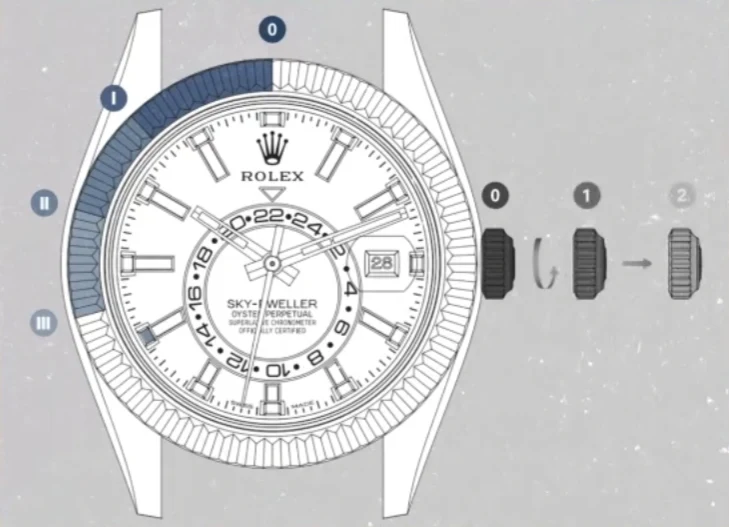
Super clone versions of the Sky-Dweller offer a traveler’s watch with dual time zones (local time via center hands, reference/home time via red triangle on off-center 24-hour disc), date at 3 o’clock, and month indication (red marker in one of 12 hour apertures).
These super clones use simplified movements for reliability and cost. Unlike higher-tier clones or originals (with Ring Command bezel selecting functions via notched positions), this version features:
- Direct bezel rotation for manual month (and sometimes date) adjustment — no automatic annual calendar.
- Crown positions for time, date, and 24-hour disc. Many owners rarely complain about these easier operations.
Important Notes:
- Crown is screw-down — always screw back clockwise firmly after use.
- Automatic self-winding with decent power reserve; manual winding available.
- Avoid setting date/month between ~8 PM and 4 AM (mechanism may engage).
Crown positions (typical for this simplified clone):
- Position 0 → Fully screwed in (wearing mode).
- Position 1 → Unscrewed (manual winding).
- Position 2 → Pulled one notch (date and 24-hour adjustment).
- Position 3 → Pulled fully out (time setting).
1. Manual Winding
- Unscrew the crown counterclockwise until it pops to Position 1.
- Turn the crown clockwise 30–40 times (full winds for reserve).
- Screw the crown back in clockwise to Position 0.
2. Setting the Month Indicator (Via Bezel)
- Hold the watch face up.
- Rotate the fluted bezel (usually counterclockwise; test gently) until the red marker aligns with the correct month aperture (one of the 12 hour markers highlights in red).
- This is manual — it won’t auto-advance with date changes.
- Some versions allow clockwise for finer control or date assist.
- No need to unscrew crown for this.
3. Setting the Date and Reference (Home) Time
- Unscrew the crown.
- Pull to Position 2 (one notch).
- Turn crown clockwise → to rapidly advance the date (at 3 o’clock).
- Turn crown counterclockwise → to move the off-center 24-hour disc (adjust red triangle to home time).
- Push crown back in and screw down to Position 0.
4. Setting the Local Time
Perform initial setup here, or use for quick time zone jumps while traveling.
- Unscrew crown and pull to Position 3.
- Turn crown bidirectional to set minute hand and center hour hand (local time).
- In many clones, the hour hand jumps in 1-hour increments independently (great for travel; 24-hour disc stays fixed).
- Date advances/retards if crossing midnight.
- Push crown to Position 0 and screw down securely.
Shop This Model:
Ready to get your own? Explore our collection:
Frequently Asked Questions
1. How many crown positions does a super clone Submariner or GMT-Master II typically have?
Most super clones feature the standard three positions: Position 1 (unscrewed for manual winding), Position 2 (middle for quick-set date), and Position 3 (fully out for time setting). The GMT-Master II also uses Position 3 to independently adjust the GMT/24-hour hand in many versions.
2. Can I set the date on my super clone Submariner or GMT-Master II at any time of day?
No—avoid adjusting the date between approximately 8 PM and 4 AM, as the date-change mechanism may be engaged. This mirrors genuine Rolex advice to prevent potential damage to the movement.
3. How do I manually wind my super clone if it’s stopped?
Unscrew the crown counterclockwise to Position 1, then turn it clockwise 30–40 times (or until you feel resistance). This provides a good power reserve. Screw the crown back down firmly clockwise afterward to maintain water resistance.
4. What’s the best way to set the GMT function on a super clone GMT-Master II?
First, set your local time (center hands) in Position 3. Then, in Position 2 or 3 (depending on the clone), adjust the independent 24-hour GMT hand (with triangle tip) to your home/reference time. Rotate the bezel to align with a third time zone if needed. Many clones allow bidirectional hour hand jumps for easy travel adjustments.
5. Does the super clone GMT-Master II show three time zones simultaneously?
It displays two time zones at once (local via center hour hand, reference via GMT hand and bezel). For a third zone, rotate the bezel to offset from the reference time—common practice among owners.
6. Can I press the chronograph reset button (bottom pusher) on the Daytona while it’s running?
No—never press the bottom (reset) pusher while the chronograph is running, as it can damage the movement in clones (and genuine pieces). Always stop the chrono first with the top pusher, then reset.
7. What do the three subdials on the Daytona super clone actually show?
The 3 o’clock subdial is the 30-minute elapsed counter, the 9 o’clock is the 12-hour elapsed counter, and the 6 o’clock is the continuous small seconds (running even when the chrono is off).
8. How does month setting work on the super clone Sky-Dweller?
Rotate the fluted bezel (usually counterclockwise, test gently) to align the red marker with the correct month aperture around the dial. This is manual—no automatic annual calendar like genuine versions—so you adjust it at the start of each month.
9. Why is the Sky-Dweller super clone simpler than the genuine model?
These clones use simplified movements for better reliability and lower cost, skipping the Ring Command bezel system. Date, 24-hour disc (home time), and month are adjusted directly via crown positions and bezel rotation—many owners prefer this for everyday ease.
10. After setting time/date/month/GMT/chrono, what should I always do with the crown?
Always push the crown back in fully and screw it down clockwise firmly (apply light pressure while turning). This ensures the watch remains water-resistant—critical for divers like the Submariner or everyday wear on all models.